
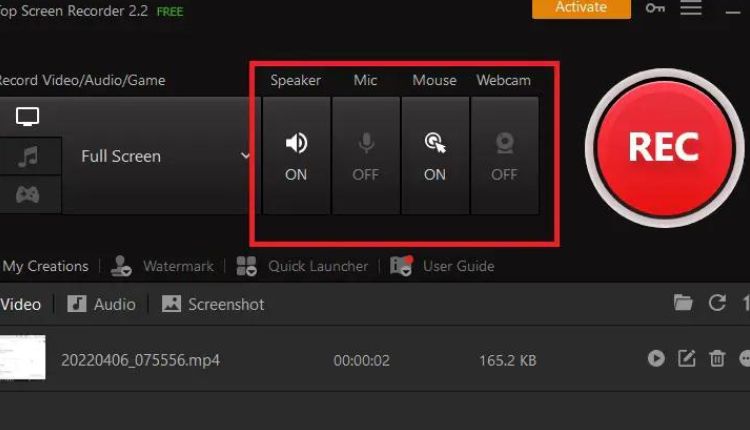
Free to download and use, iTop Screen Recorder provides high-quality video and audio recording. The software allows users to customize their recording area, show mouse click effects, set custom hotkeys, and enable GPU hardware acceleration. It also offers a variety of basic video editing options, such as cropping and altering the size of videos. Additionally, it lets users export and share recordings to YouTube, Vimeo, Facebook, and Instagram.
Free To Download
Free download of iTop Screen Recorder is a powerful tool that provides users with the ability to record their computer screen and webcam with high-quality video and audio while keeping CPU utilization low. It also has a range of features that make it ideal for recording online meetings and presentations, creating tutorial videos, capturing gameplay, and conducting webinars.
The software allows you to record high-quality (4k supported) videos for the full screen, a window, or any selected region. It can also capture audio from the speaker and microphone simultaneously, or record your gameplay and add a live commentary. In addition, it offers a light built-in video editor and easy sharing to YouTube, Facebook, Instagram, Google Drive, etc. It also comes with a simple but effective video compressor to help reduce your video file size while maintaining original quality.
High-Quality Video And Audio Recording
iTop Screen Recorder allows users to capture onscreen content at 4K resolution without any lag. It also supports 17 mainstream video formats and enables users to record video with their preferred audio source. The tool comes with an in-built video editor that helps users trim, crop, add effects and annotations, and more to their recordings. It also offers a number of video filters and images to choose from, so users can customize their videos to match their needs.
This tool also lets users create a customized watermark on their videos, which protects them from copying and unauthorized use. It can also help them reduce the size of their videos, saving storage space and allowing them to share them more easily. The tool also includes a teleprompter, which is useful for recording tutorials and video presentations.
Easy To Use
With a user-friendly interface, iTop Screen Recorder makes it easy to capture video and audio. It has 4 recording modes that allow you to create high-quality videos, such as video classes, Zoom meetings, gameplay, tutorials, and product demos. The software also has built-in video editor tools that let you edit your videos easily. Its Quick Editor is designed for basic editing, while its Advanced Editor offers more features and tools. It also has a screenshot tool that lets you take snapshots of your PC screen.
The program’s performance is impressive, as it can record videos in 1080p or even 4K resolution. It uses hardware acceleration to handle the task and reduce CPU usage, resulting in smooth recordings with no lags or FPS drops. It also supports multiple output formats, including MP4, AVI, MKV, MOV, FLV, TS, and GIF.
Supports Multiple Devices
This software offers a full range of features for recording video and audio. It supports all mainstream formats, and is capable of transferring videos without losing quality. It also includes a video editor for enhancing recorded videos. The software is available on both Windows and Mac computers. Its flexible screen capture mode allows users to record specific application windows, a custom area, or a full screen. It can also record both system and microphone audio simultaneously. It also has a game mode that can record gameplay at 1080p with no lags.
The software also allows you to add a watermark or logo to your videos for branding purposes. This feature is helpful when creating tutorials or presentations. It also lets you set a timer to stop recordings automatically.
Updates
iTop Screen Recorder offers frequent updates to enhance the functionality of its software. With the latest version, users can enjoy new features including a teleprompter and cursor magnifier. It also allows them to add stickers and filters to recorded videos. Moreover, it enables users to record games without lag and in 4K resolution. It can capture a full screen, window, or selected region. Additionally, it can capture system audio or microphone audio. The program can be downloaded from the developer’s website for free. It is compatible with Windows OS. It is important to note that this application may be installed on the computer without user consent. This is because it is offered through advertisements, cracks for games, or bundled with other programs.
Conclusion
iTop Screen Recorder is an outstanding software for recording video, audio and webcam with advanced tools. Its performance is incredibly high with hardware acceleration. It can record 4K videos and high fps game clips without any lag. It has multiple export and sharing options, including direct upload to online platforms. iTop Screen Recorder also offers a simple but effective built-in video editor.
